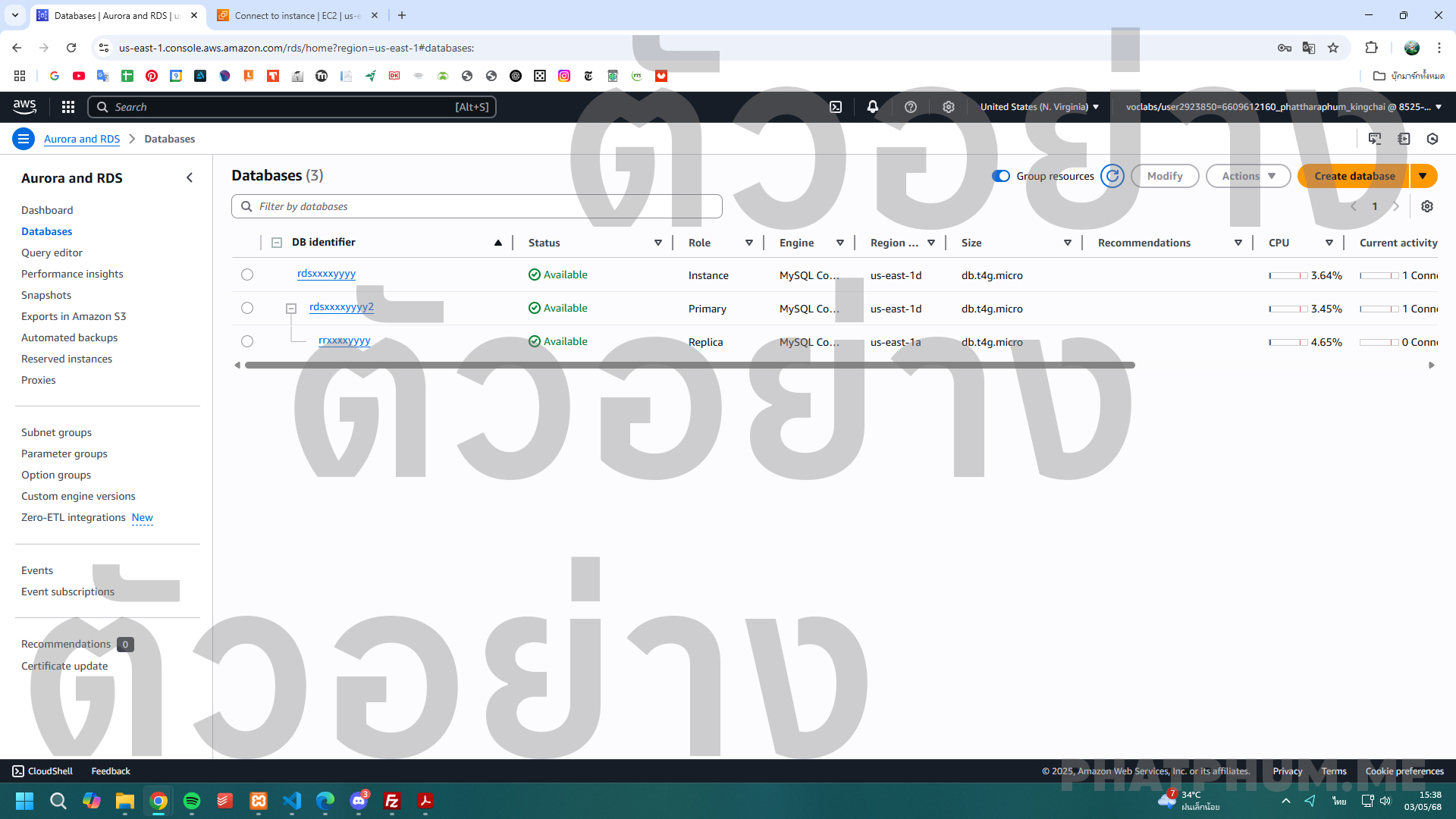
ข้อที่ 10 การสร้าง RDS Instance แบบ Free Tier ด้วย MySQL Engine และการตั้งค่า Read Replica เพื่อสำรองข้อมูล
🧠 เป้าหมาย
- สร้าง RDS MySQL instance ชื่อ
rdsxxxxyyyy(Free Tier) - สร้าง Read Replica จาก instance นี้ ชื่อว่า
rrxxxxyyyy - แสดง ชื่อ + สถานะ "Available" ของทั้ง RDS ตัวหลักและ Read Replica ในภาพเดียว
🧰 บริการที่เกี่ยวข้อง
- Amazon RDS (MySQL) – สำหรับ instance หลักและ read replica
- RDS Read Replica – ใช้สำหรับอ่านข้อมูลได้เร็ว โดยไม่กระทบ instance หลัก
- Security Group – ใช้เหมือนเดิม ไม่ต้องเปลี่ยน
🛠️ ขั้นตอนการทำ (แบบละเอียด)
🔹 1. สร้าง RDS MySQL Instance (Free Tier)
- ไปที่ AWS Console → RDS > Create Database
-
ตั้งค่า:
- Engine: ✅ MySQL
- Templates: ✅ Free Tier
- DB Instance identifier:
rdsxxxxyyyy - Master username:
admin - Master password: ตั้งเอง เช่น
Test1234! - Enable Public access ✅ Yes
- ใช้ค่าปกติที่เหลือ แล้วคลิก Create Database
- รอจนสถานะ = ✅ Available
🔹 2. สร้าง Read Replica
- ไปที่ RDS > Databases → คลิกชื่อ
rdsxxxxyyyy - คลิกปุ่ม Actions > Create read replica
-
ตั้งค่า:
- DB instance identifier:
rrxxxxyyyy - Keep default values (including storage)
- ✅ "Enable automated backups" ควรเปิดไว้
- Enable Enhanced monitoring ติ๊กออก
- DB instance identifier:
- คลิก Create read replica
- รอจน Read Replica สถานะเป็น ✅
Available
🧪 สิ่งที่ควรรู้
- Read Replica จะอยู่ในสถานะ Read-only
- คุณสามารถเลือกว่าจะสร้างใน Region เดียวกัน หรือ Cross-region (ใช้ default ก็พอสำหรับ Lab นี้)
- การซิงค์จาก master → replica เป็นอัตโนมัติ
📸 สิ่งที่ต้องแคปส่ง
ภาพหน้าจอเดียว ที่แสดง:
- ชื่อของ RDS หลัก:
rdsxxxxyyyy+ สถานะ ✅Available - ชื่อของ Read Replica:
rrxxxxyyyy+ สถานะ ✅Available
✅ แนะนำใช้หน้า RDS > Databases (แสดงรายการทั้งคู่ในตารางเดียวกัน) หรือใช้ Snipping Tool / จัดหน้าจอแบ่งครึ่ง